Minecraft Rainbows in 2026: Straight, Stretched, and Weirdly Perfect
Minecraft rainbow builds are easier with display entities, creating a striking floating color beam without thousands of wool blocks.
It’s 2026, and Minecraft still refuses to hand me a rainbow. I can get clouds, sun, moon, stars, lightning, even a decent sunset if I squint, but a proper arc of color across the sky? Nope. For years my only option was the wool route: gather thousands of blocks, build a giant rainbow by hand, and pretend it looks natural. It doesn’t. It’s physical, blocky, and very much part of the ground. Then display entities entered the chat, and suddenly data pack creators could fake a rainbow that hangs in the air. It’s not perfect, but it’s close enough that I keep coming back to it.
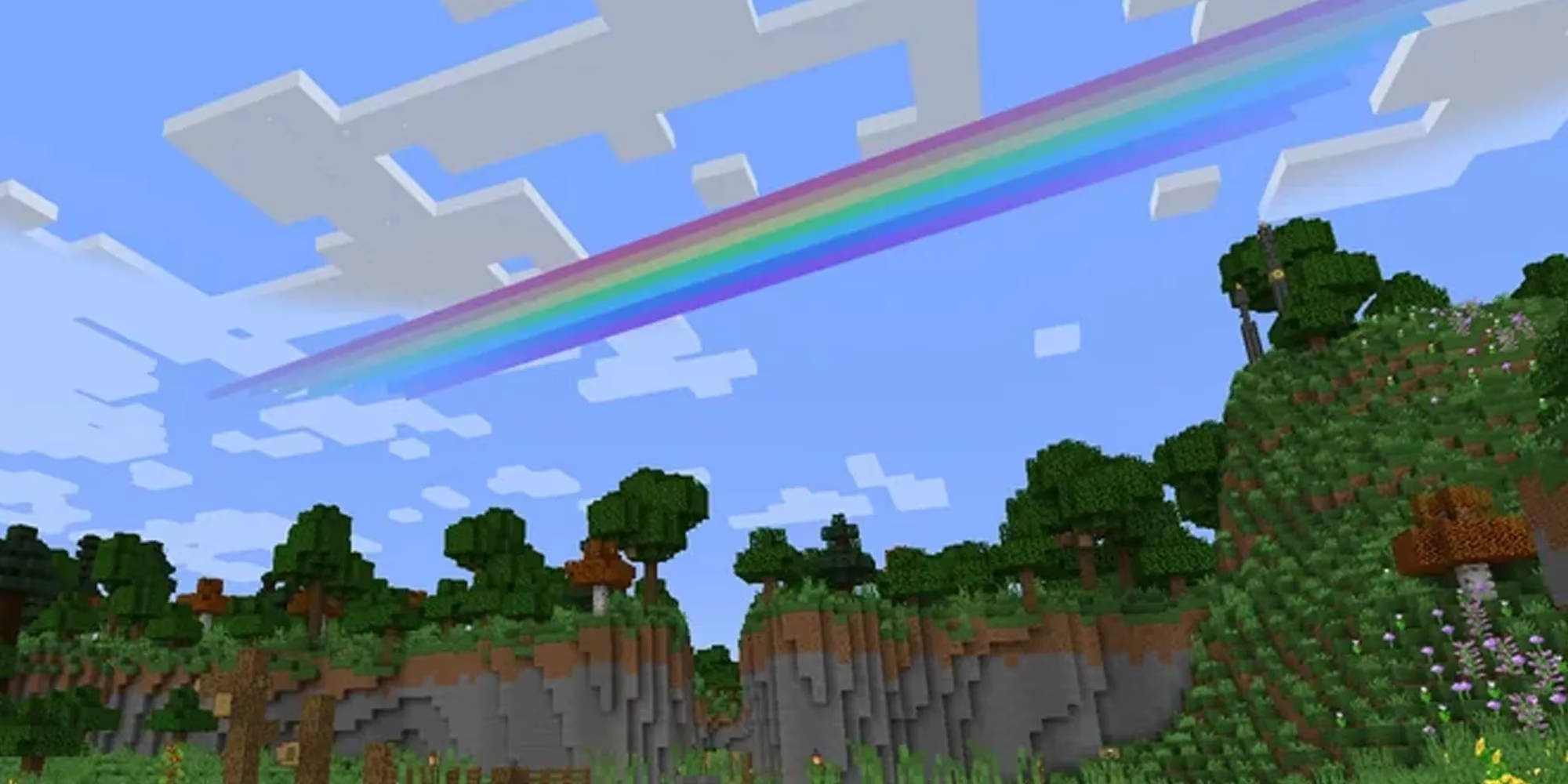
Here’s the twist: the rainbow you can make with modern display entities is completely straight. It fires off in one direction like the Bifrost bridge from Norse mythology, not an arch. Why would I want a rainbow that looks like a laser beam? Honestly? Because it’s weirdly satisfying. It’s a giant stretched stripe of color floating in the sky, and in a game made of cubes, a perfectly curved rainbow might feel more cursed than a straight one. Reddit user u/Sany_Wave made a good point: a straight rainbow is arguably more realistic considering Minecraft physics. I laughed, but I also nodded.
Surprisingly, this doesn’t require a wall of commands. If you have a resource pack—like the one u/Ercerus uses—you can create the effect with one block and one command. The command stretches a single block, which in this case is an altered white stained glass pane. The resource pack changes that pane’s model data, so the stretched block looks like a rainbow instead of plain glass. If you don’t want to download anything extra, you can use seven blocks of colored wool and write seven lines of code. You’ll get a similar effect, just with more commands and a chunkier look.
Here’s the exact command u/Ercerus used, with the caveat that it depends on their resource pack. If you’re using different blocks or your own pack, you’ll need to adjust it or repeat it several times:
/summon minecraft:item_display ~ ~50 ~ {item:{Count:1,id:"minecraft:white_stained_glass_pane",tag:{CustomModelData:12}},transformation:[20f,0f,0f,0f,0f,13f,0f,-2.5f,0f,0f,13f,0f,0f,0f,0f,1f],Rotation:[0.0f,0.0f],item_display:head,view_range:0.95f,shadow_radius:0f,Tags:[giant_rainbow]}
Now, the big limitation: display entities can only scale, rotate, and shear a block. They can’t curve it. When you drag out that glass pane with a rainbow skin, you get a massively stretched version of the block. Bending it isn’t possible yet. That means no true arc, no pot-of-gold curve, no gentle bow. Is that a dealbreaker? For some builders, yes. For me, it’s a challenge. Knowing Minecrafters, someone will find a way to make a perfectly curved rainbow one of these days. Maybe it’ll use armor stands, maybe a chain of display entities, maybe a data pack trick I haven’t imagined. When they do, I’ll be there with my command block and too much free time.
As of 2026, display entities are still one of the most flexible vanilla-adjacent tools for this kind of trick. Command syntax can shift between snapshots, so test in your version before building a showcase. I always back up my world first, then try the command in a superflat test area. It saves me from accidentally stretching a glass pane across my survival base. Trust me, I’ve learned that lesson.
| Approach | Effort | Look | Extra files? |
|---|---|---|---|
| Single stretched pane + resource pack | Low | Smooth, straight stripe | Yes |
| Seven colored wool blocks | Medium | Chunky, segmented stripe | No |
| Hand-built wool rainbow | High | Physical, blocky arch | No |
If you want to try it yourself, here’s my quick checklist:
-
🧱 Back up your world and test in a creative superflat.
-
🎨 Load a resource pack that changes the white stained glass pane, or plan to use multiple colored blocks.
-
⌨️ Run the display entity command and adjust the transformation values until the stripe looks right.
-
🔄 Use rotation and shear to angle it across the sky.
-
📸 Share screenshots, because half the fun is watching other players ask how you did it.
Will a straight rainbow ever feel like a real rainbow? Maybe not. But it’s a whole lot closer than anything I had in vanilla Minecraft before. And sometimes, in a game built from squares, a little weirdness is exactly the point. So go on—stretch a glass pane, summon a giant stripe of color, and make the sky a little stranger. Just don’t ask me to curve it yet. 😄